Data Classification That People Actually Follow
Four labels, one rule about copies, and a snapshot nobody could explain.
@18xBan · GRC Series · Chapter 04
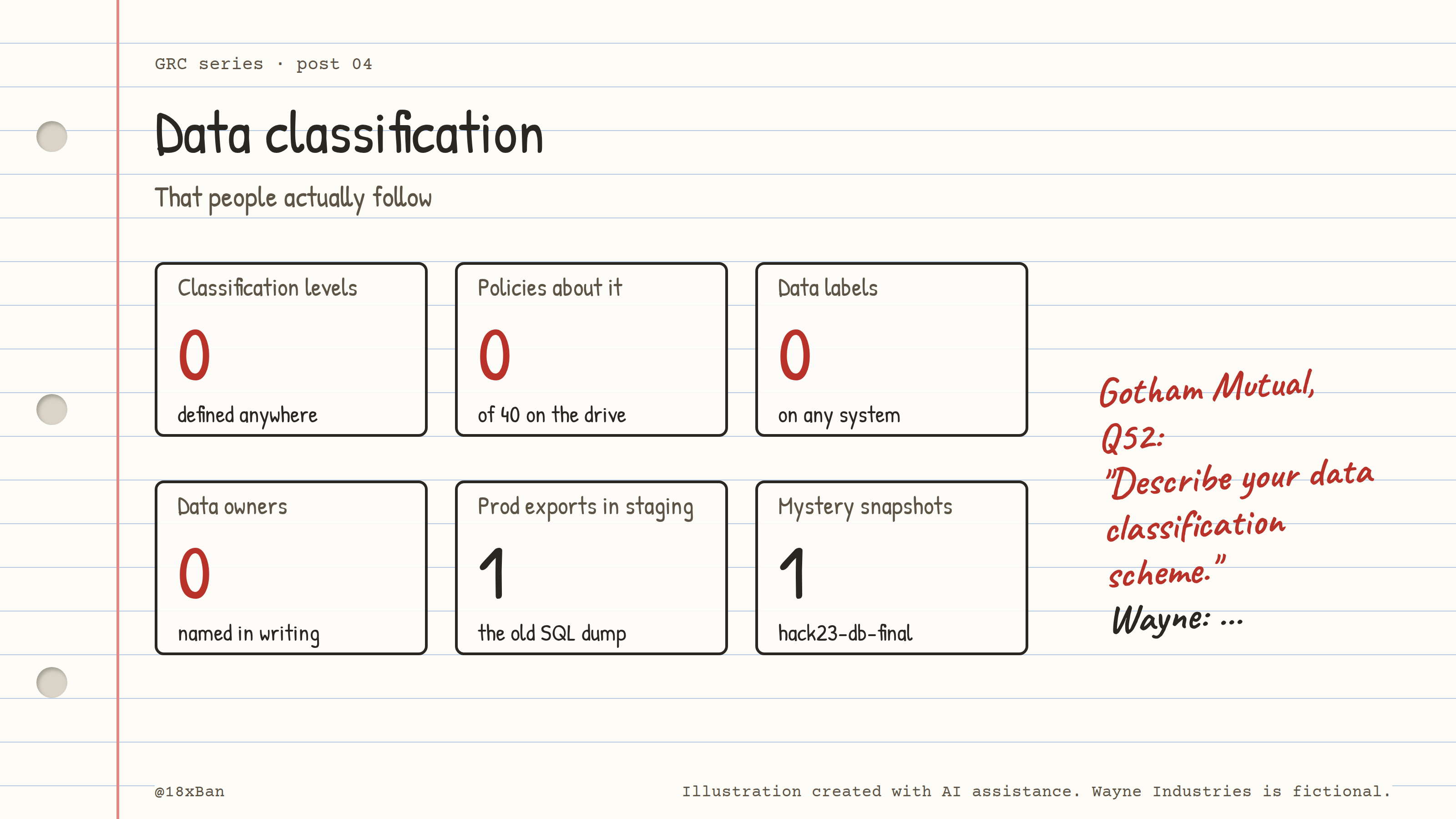
Zero labels, zero data owners, and two copies of customer data in places they shouldn't be.
Tuesday, 9:31 AM: "So what's actually in it?"
The closure of hackathon-2023 is still on hold. Last week's inventory found an RDS snapshot in that account called hack23-db-final. Postgres, taken in November 2023. Nobody could say what was inside.
Priya pings you again.
Priya: Can I kill the hackathon account yet? It's costing us money. You: Not until we know what's in that snapshot. Priya: It's demo data. Probably. You: "Probably" is what we said about the staging bucket.
She doesn't answer that one.
Because the staging bucket is the other loose end. The public access is blocked, but prod-export-2024.sql.gz is still sitting in wayne-staging-data. A production database export, in a staging bucket, that was public until a few weeks ago.
Then Dan forwards one more thing. Gotham Mutual's questionnaire, question 52:
Describe your data classification scheme and how it is applied to customer data.
Wayne doesn't have one. Not in the 40 policies on the shared drive, not in anyone's head.
So this week's job is simple to say and harder to do: decide what kinds of data Wayne has, what each kind is allowed to do, and then go look at those two files.
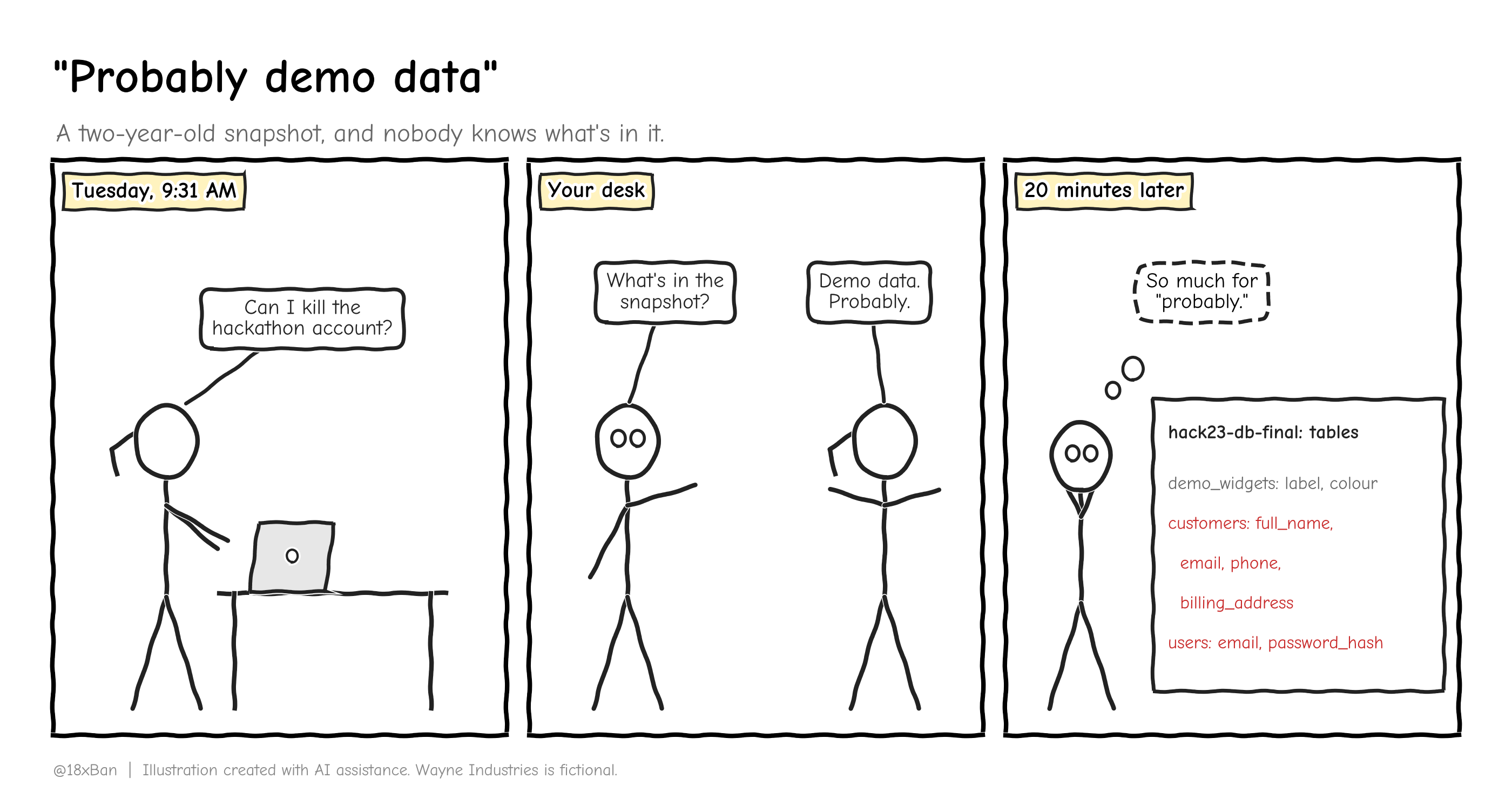
"Probably demo data" isn't a classification.
What data classification actually is
Data classification means sorting information into a few levels based on how much damage it would do if it leaked, got changed or disappeared. Each level comes with handling rules: where the data may live, who may see it, how it's protected and when it's deleted.
A label is how you mark which level a piece of data belongs to. On a document that might be a header. In AWS it's usually a tag.
Think of the care label inside a shirt. The label doesn't wash anything. It just tells whoever picks up the shirt what they're allowed to do with it: cold water, no dryer, don't bleach. Data labels work the same way. The label is useless on its own. What matters is the rule attached to it, and whether anyone follows it.
That's where most classification programs die. They pick labels, write a policy, and never connect the labels to anything people or systems actually do.
The unpopular truth: if everything is Confidential, nothing is. A scheme where 95% of files carry the top label tells people nothing, and they stop reading the label within a week.
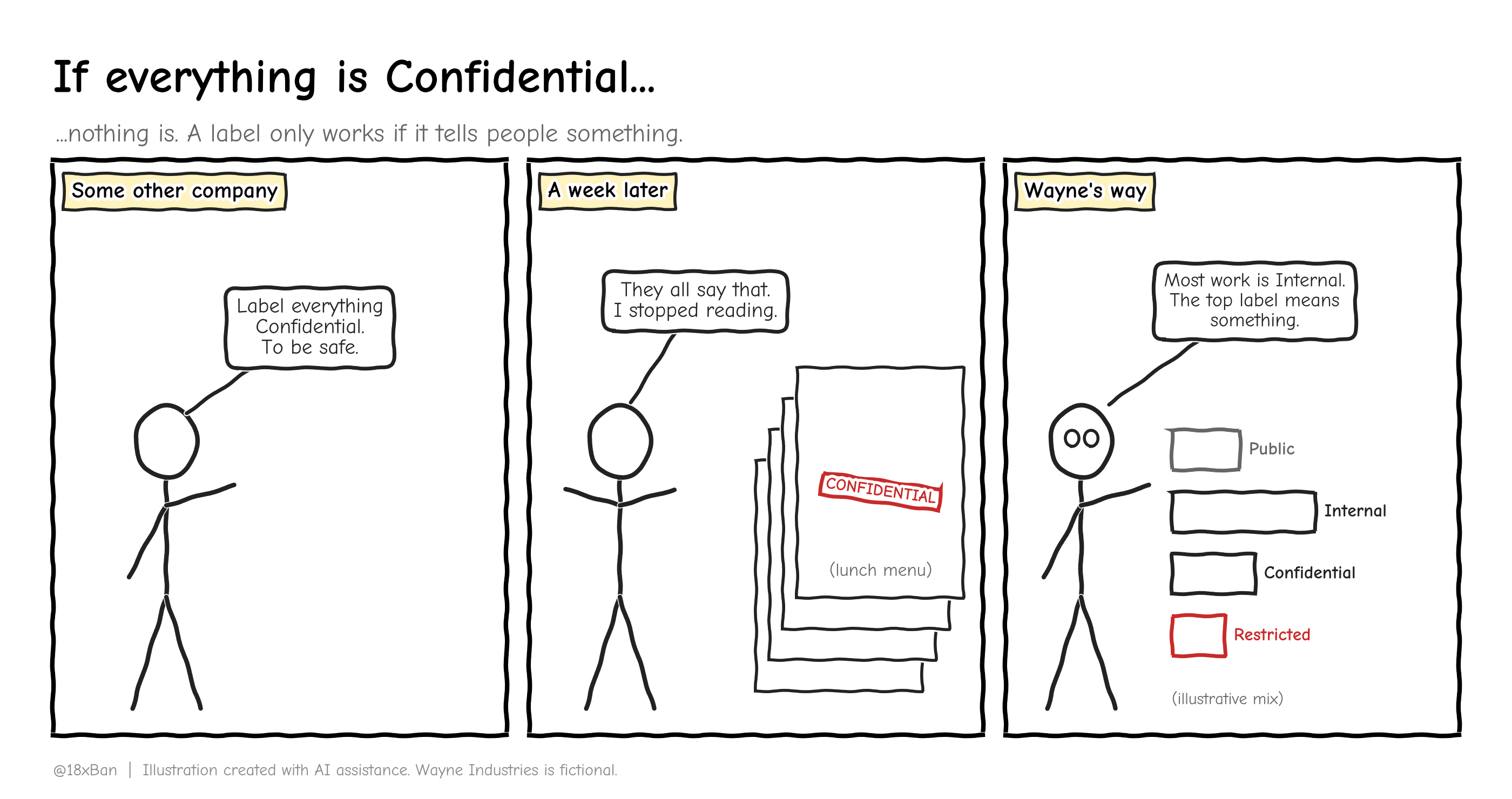
When every file says Confidential, nobody reads the label.
Why it matters at Wayne right now
Classification isn't paperwork for its own sake. It's the thing that turns "is this bad?" into a question with an answer.
Take the staging export. Without a scheme, the conversation goes:
Priya: it's just staging.
Dan: but it came from production.
You: does it have customer data?
Everyone: no idea.
With a scheme, the conversation is one line: customer personal information is Restricted, and Restricted data never lives outside production. The export breaks the rule, full stop. No debate about which environment "counts."
The law points the same way. PIPEDA, the Canadian privacy law that covers Wayne's customer data, says safeguards must match how sensitive the information is. More sensitive information gets more protection. You can't do that if you haven't decided what's sensitive.
Wayne before
Data classification scheme: none
Policy covering classification: none (0 of 40 shared-drive policies)
Labels applied to any data: none
Named data owners: none
Rule for production data outside production: none
Wayne after (approved by Dan, Tuesday)
| Level | Means | Examples at Wayne | Where it may live | Who can access |
|---|---|---|---|---|
| Public | Meant for anyone | Marketing site, published docs | Anywhere | Anyone |
| Internal | Fine for staff, not for strangers | Wiki, runbooks, sprint notes | Wayne-managed systems | All staff |
| Confidential | Would hurt Wayne if it leaked | Source code, contracts, vendor questionnaires | Wayne-managed systems, access by team | Named teams |
| Restricted | Would hurt customers if it leaked | Customer personal info, production database, backups, exports and snapshots of either | wayne-prod only |
Named people, approved in writing |
Three rules sit under the table. They do most of the work:
A copy is the same class as the original. An export, snapshot or backup of Restricted data is Restricted. Moving it doesn't downgrade it.
Label the system, not every file. Each system gets a default level. Everything inside it inherits that level unless the owner says otherwise.
When in doubt, go one level up for now, and ask the owner. The owner decides within five working days.
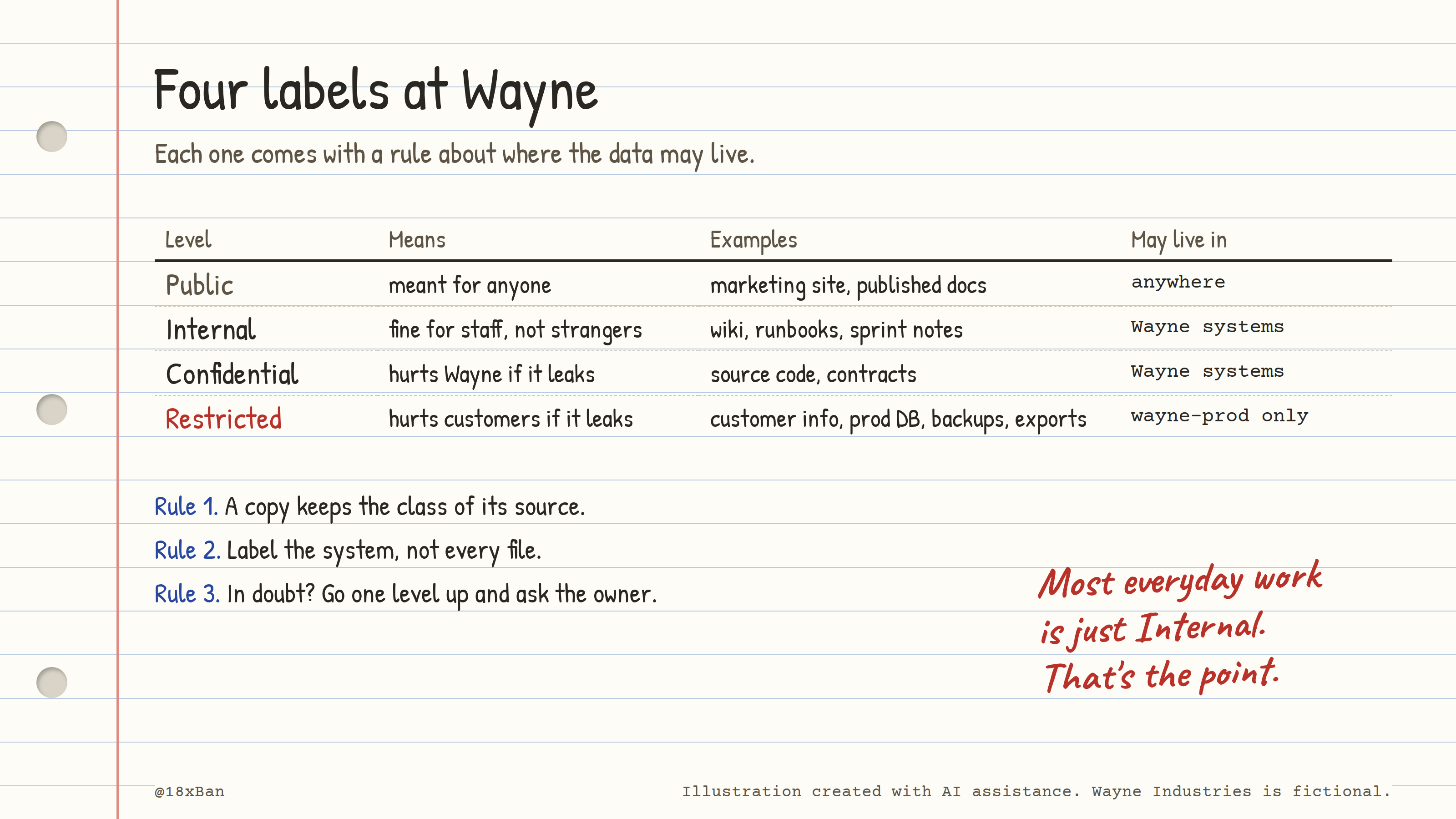
Four levels, each with a rule about where the data may live.
The unpopular truth: most people will never label a document by hand. Don't build a scheme that depends on them doing it. Put the label on the system, and let the system carry it.
Field by field: what each column is for
| Field | What it holds | Why it's there |
|---|---|---|
| Level | The name of the class | Something short enough to fit in a tag |
| Means | The harm if it leaks, changes or disappears | Lets people classify new data without asking you |
| Examples | Real Wayne data types | Nobody reads definitions. Everybody reads examples. |
| Where it may live | Allowed environments and systems | The rule that caught the staging export |
| Who can access | Audience for each level | Feeds access reviews later |
| Handling rules (in the full policy) | Encryption, sharing, printing, transfer | What people actually do differently per level |
| Retention and disposal (in the full policy) | How long it's kept, how it's destroyed | PIPEDA expects data you no longer need to be destroyed or anonymized |
| Data owner (in the inventory) | The named person who decides the level | Without an owner, "ask the owner" means "ask nobody" |
Step 1: find out what's in the snapshot
You don't open a two-year-old snapshot in place. You restore it to a temporary, private database, look at the structure, and delete the copy when you're done.
First, check the snapshot was never shared outside the account:
aws rds describe-db-snapshot-attributes \
  --db-snapshot-identifier hack23-db-final \
  --profile hackathon-2023
{
    "DBSnapshotAttributesResult": {
        "DBSnapshotIdentifier": "hack23-db-final",
        "DBSnapshotAttributes": [
            {
                "AttributeName": "restore",
                "AttributeValues": []
            }
        ]
    }
}
Sample output (illustrative). Wayne Industries is fictional.
An empty restore list means no other AWS account can restore it. If you ever see "all" in there, the snapshot is public, and that's a different, more urgent day.
Next, restore it to a private instance:
aws rds restore-db-instance-from-db-snapshot \
  --db-instance-identifier hack23-inspect \
  --db-snapshot-identifier hack23-db-final \
  --db-instance-class db.t3.micro \
  --no-publicly-accessible \
  --profile hackathon-2023
Then look at column names, not rows. You want to know what kind of data is there without reading anyone's personal details:
psql -h hack23-inspect.xxxxxxxx.us-east-1.rds.amazonaws.com -U postgres -d appdb -c "
SELECT table_name, string_agg(column_name, ', ') AS columns
FROM information_schema.columns
WHERE table_schema = 'public'
GROUP BY table_name ORDER BY table_name;"
   table_name    |                        columns
-----------------+--------------------------------------------------------
 customers       | id, full_name, email, phone, billing_address, created_at
 demo_widgets    | id, label, colour, created_at
 invoices        | id, customer_id, amount, issued_at
 users           | id, email, password_hash, last_login
(4 rows)
Sample output (illustrative). Wayne Industries is fictional.
demo_widgets is the demo. customers is not. Names, emails, phone numbers and billing addresses are customer personal information. Under the new scheme, that's Restricted, and it's sitting in a hackathon account.
So much for "probably."
Step 2: check the staging export the same way
Same idea. Read the table definitions, not the data. You can stream the file straight from S3 and only keep the CREATE TABLE lines:
aws s3 cp s3://wayne-staging-data/prod-export-2024.sql.gz - --profile wayne-staging \
  | gunzip | grep -E "^CREATE TABLE"
CREATE TABLE public.customers (
CREATE TABLE public.invoices (
CREATE TABLE public.subscriptions (
CREATE TABLE public.support_tickets (
CREATE TABLE public.users (
Sample output (illustrative). Wayne Industries is fictional.
Run this from an admin host you control, not your personal laptop. You're handling Restricted data now, even if you only keep the table names.
Same answer: a full copy of production customer data. Restricted, in staging. Rule 1 says the copy doesn't get a discount for living somewhere else.
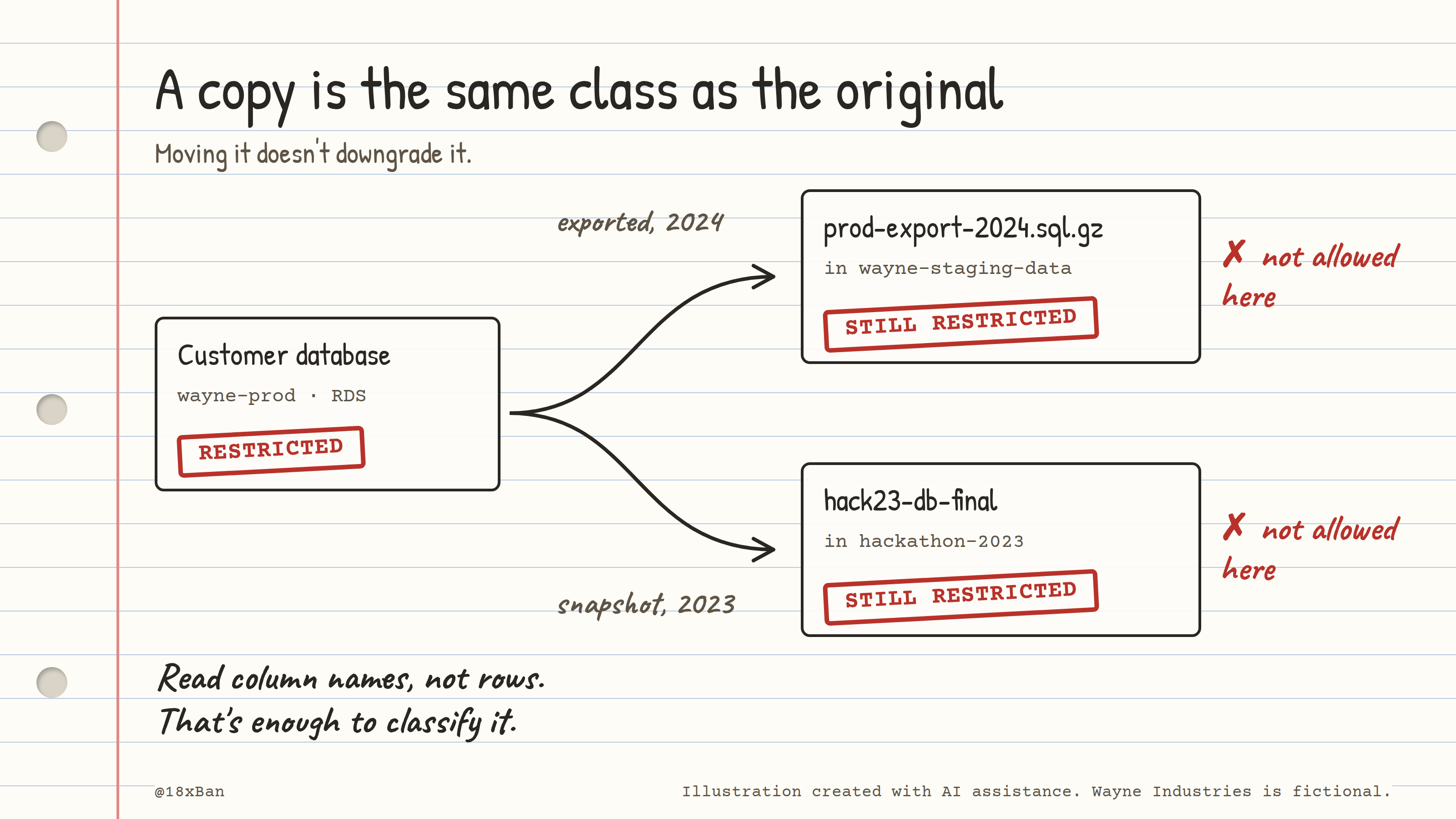
A copy is the same class as the original, wherever it ends up.
Step 3: label the systems and the two files
Rule 2 says label the system. So the production database and each AWS account get a default level as a tag. Then the two problem files get their own tags, so anyone who finds them later sees what they are.
aws s3api put-object-tagging \
  --bucket wayne-staging-data \
  --key prod-export-2024.sql.gz \
  --tagging 'TagSet=[{Key=data-classification,Value=restricted},{Key=data-owner,Value=dan.okafor},{Key=decision-due,Value=see-register}]' \
  --profile wayne-staging

aws s3api get-object-tagging \
  --bucket wayne-staging-data \
  --key prod-export-2024.sql.gz \
  --profile wayne-staging
{
    "TagSet": [
        { "Key": "data-classification", "Value": "restricted" },
        { "Key": "data-owner", "Value": "dan.okafor" },
        { "Key": "decision-due", "Value": "see-register" }
    ]
}
Sample output (illustrative). Wayne Industries is fictional.
Before the tag, that same command returned an empty TagSet. That empty list is what "unclassified" looks like in AWS.
Tag names matter more than you'd think. Pick one key (data-classification) and four lowercase values, and write them into the policy. If one person tags Restricted, another RESTRICTED and a third sensitive, no automated check will ever work.
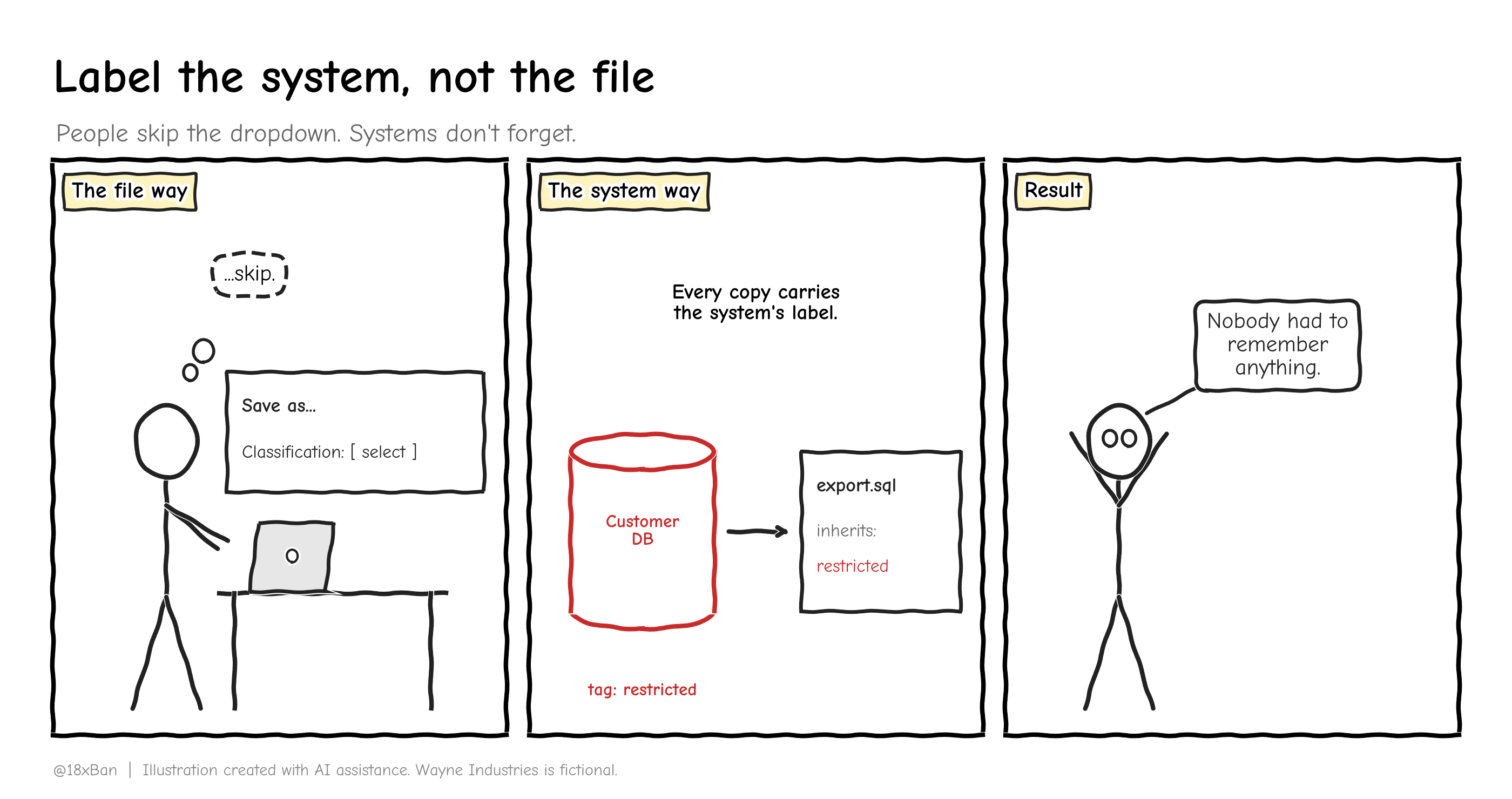
People skip the dropdown. Systems don't.
Step 4: decide what happens to each copy
A label tells you the rule. It doesn't make the decision. That's the data owner's job, and for customer data at Wayne that's Dan.
The two files get different answers, and the reason is worth spelling out.
The snapshot was never public and never shared. Nobody needs it: the hackathon ended two years ago, and production has its own backups. Dan approves deletion in writing on Thursday. You delete the snapshot and the temporary hack23-inspect instance, and save the confirmation. That approval, plus the before-and-after listing, becomes Evidence #4.
Priya can finally close the account.
The staging export is harder. It sat in a bucket that was public, and nobody had turned on access logging for that bucket. So nobody can prove who did or didn't download it. Whether that counts as a privacy breach Wayne must report is a question for Dan and legal counsel, not for a classification label.
So it isn't deleted yet. Deleting it now could destroy the only record of what was exposed. Instead:
Access is limited to you and Dan through the bucket policy.
It's tagged Restricted, with Dan as owner.
Dan has the breach question in writing, with a date to decide by.
Once counsel closes the question, it's deleted and the deletion is recorded.
The unpopular truth: the best classification decision is often deletion. Data you don't have can't leak, can't be subpoenaed and doesn't need a label. But you delete on purpose, with a record, and never while someone still needs to answer "what was exposed?"
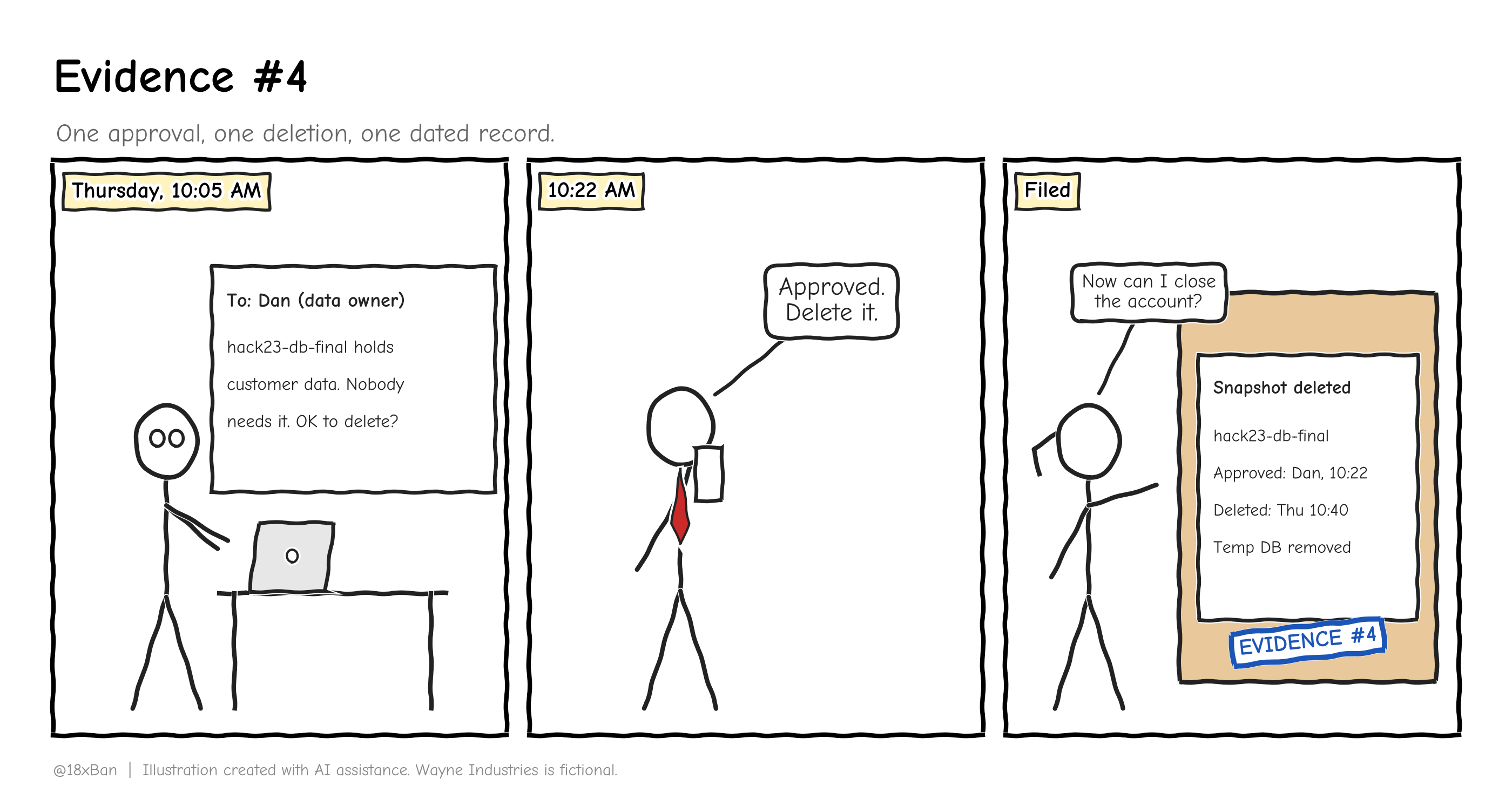
One approval, one deletion, one dated record.
Step 5: the data inventory, before and after
Classification only works if it lands in your inventory. CIS Safeguard 3.2 asks for a data inventory based on your data management process, covering sensitive data at a minimum. Wayne's asset register from last week gets four new columns.
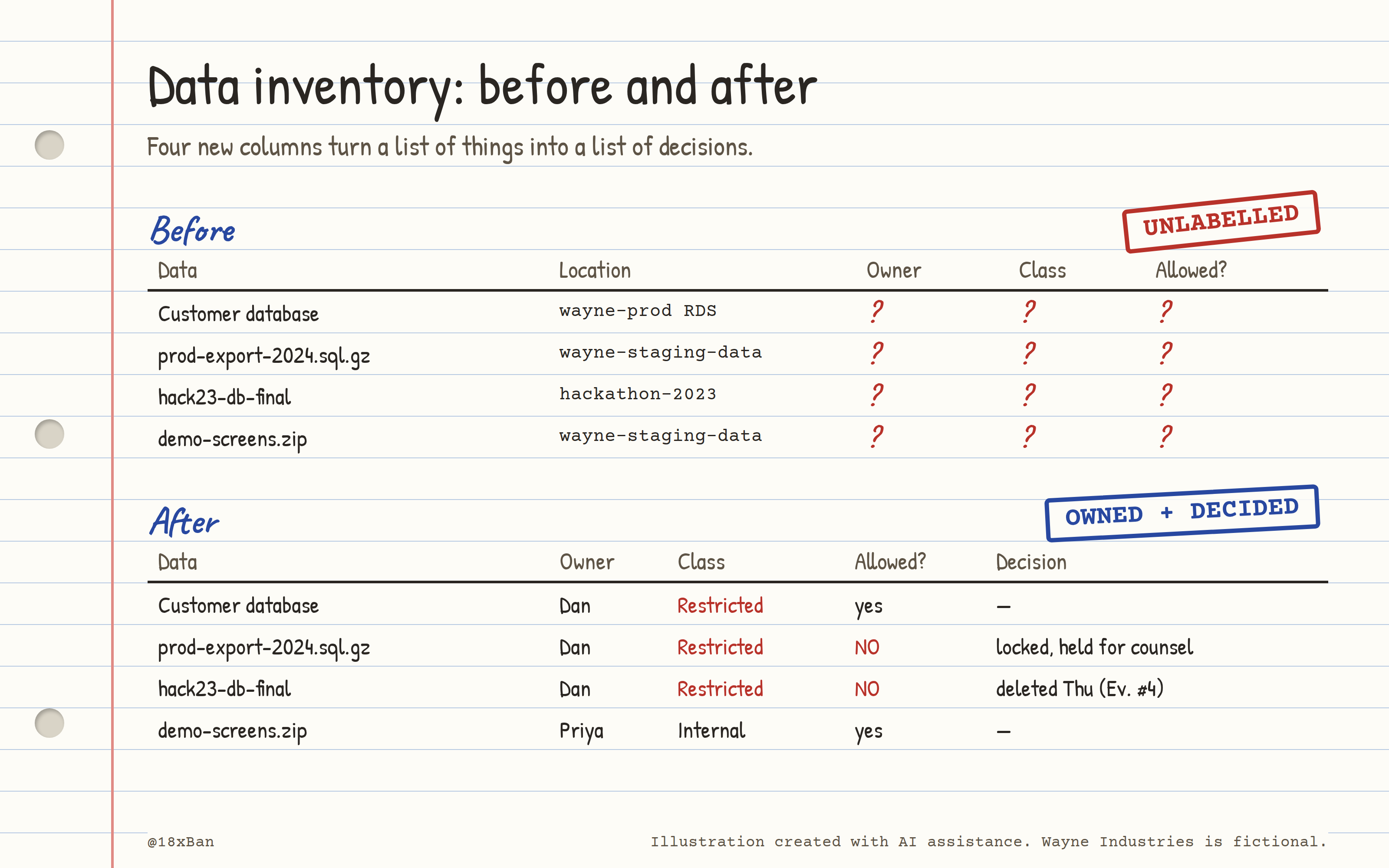
Four new columns turn a list of things into a list of decisions.
What an auditor accepts vs rejects
| The auditor asks | Rejected | Accepted |
|---|---|---|
| "Show me your classification scheme." | A policy on the shared drive with no approval and no date | A dated scheme approved by a named owner, with examples |
| "How is it applied?" | "Staff are trained to label documents." | System default levels, visible as tags, plus the inventory showing each data store's class |
| "Pick one: this file. What's its class?" | Someone guesses | The tag says Restricted and the inventory agrees |
| "Where is Restricted data allowed?" | "Somewhere secure" | "wayne-prod only," plus a check that shows where it actually is |
| "What happens to data you no longer need?" | "We keep everything, just in case." | Retention periods per level, and a dated deletion record |
| "When was the scheme last reviewed?" | Never | A review date, and the next one scheduled |
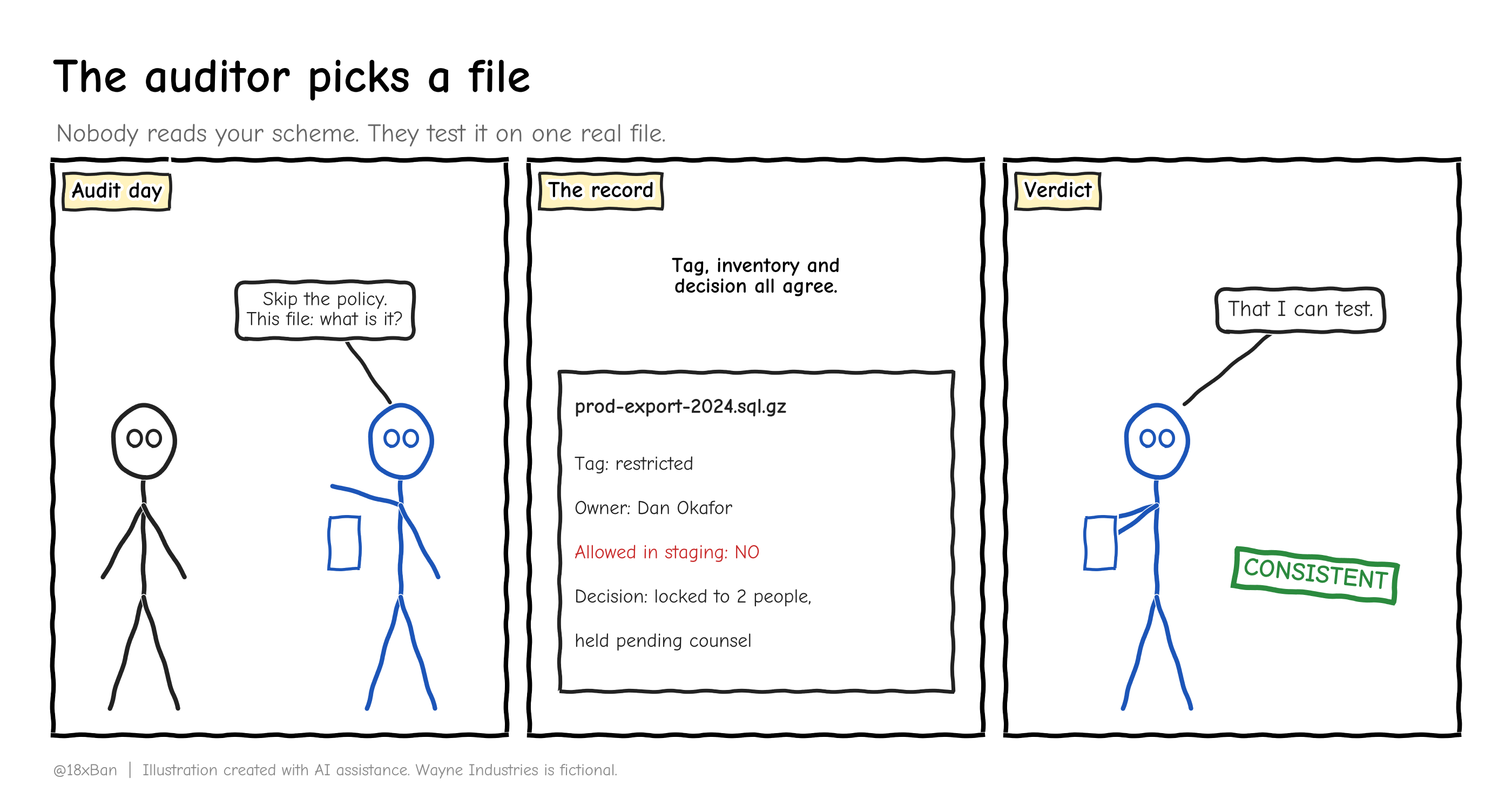
The auditor won't read your scheme. They'll pick a file and ask what it is.
What you actually do on Monday
Get the CIS Data Management Policy Template. Don't write your own from a blank page.
Pick three or four levels. Write one sentence of meaning and three real examples for each.
Write the copy rule. Exports, snapshots and backups keep the class of their source.
Name an owner for your most sensitive data. One person, in writing.
Label your systems, not your files. One tag key, fixed lowercase values.
Look for production data outside production. Check staging buckets, old snapshots and dev databases. Read column names, not rows.
Decide each stray copy on purpose: delete, move or hold. Keep the record.
Put a review date on the scheme. CIS asks for at least once a year.
Where classification lives in the frameworks
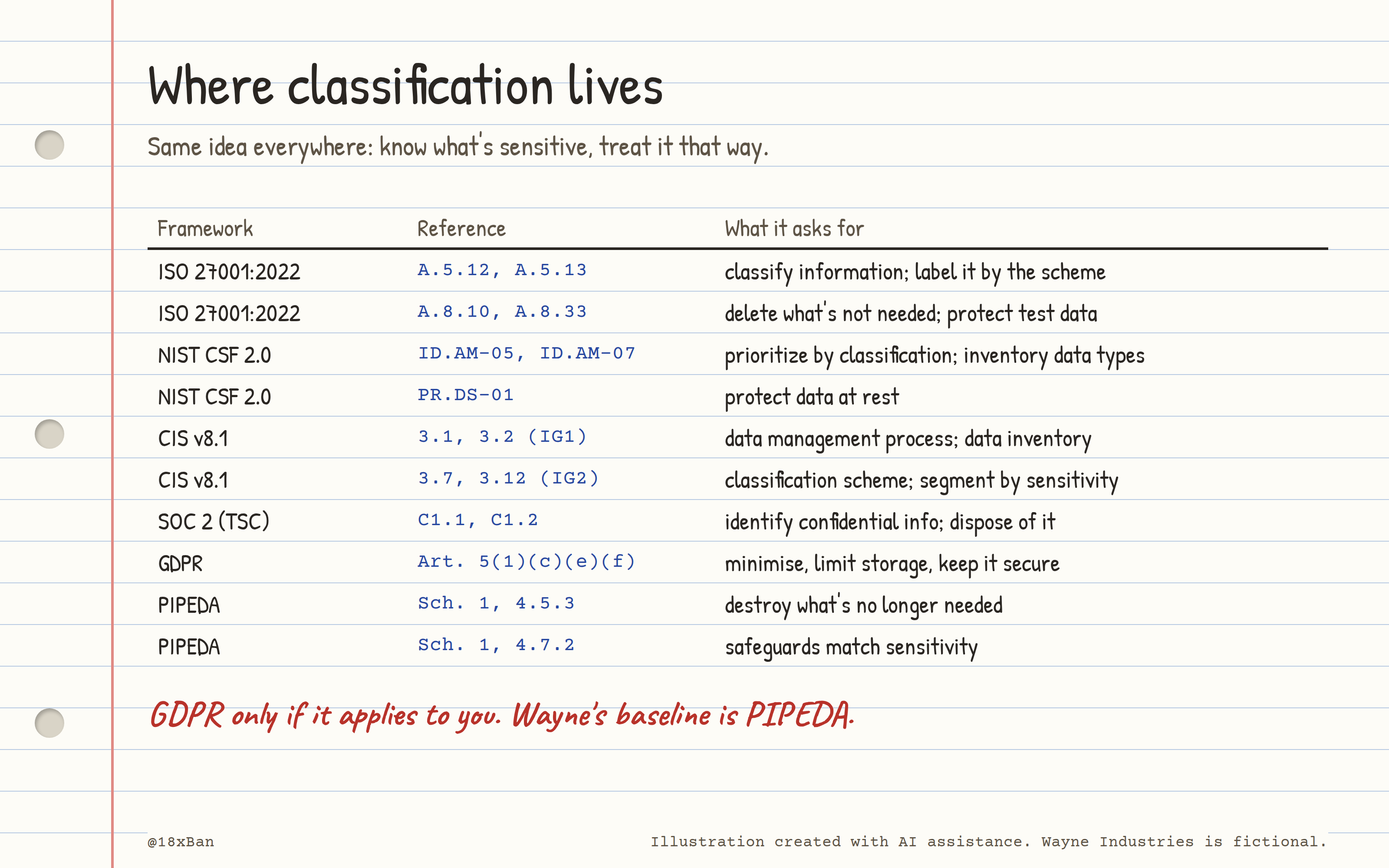
Every framework asks the same thing: know what's sensitive, and treat it that way.
Maturity ladder
| Stage | 20 people | 200 people | 2,000 people |
|---|---|---|---|
| Scheme | Three levels on one page, in a shared doc | Four levels in an approved policy, reviewed yearly | Scheme tied to legal and regulatory registers, reviewed by a committee |
| Labelling | A column in the asset spreadsheet | Tags on cloud accounts, databases and buckets | Automatic sensitivity labels in email and documents, enforced by policy |
| Discovery | Someone checks staging by hand, twice a year | Scheduled scans of cloud storage for personal data | Data discovery tooling across cloud, SaaS and endpoints |
| Enforcement | "Please don't copy prod data to staging" | Guardrails that block untagged or Restricted data outside production | Data loss prevention on the network, endpoints and SaaS |
| Evidence | Dated emails from the owner | Inventory with class, owner and decision per data store | Dashboards of labelled data, exceptions and deletions |
Be honest about the left column. At 20 people, a spreadsheet column and an owner who answers emails is a real control.
Where Wayne sits: at about 240 accounts, Wayne is in the 200-person column on paper, with the scheme approved and the first tags applied. Discovery is still manual and nothing blocks the next export yet. That's a 20-person program with a 200-person policy, and that's fine for week four.
Cheatsheet
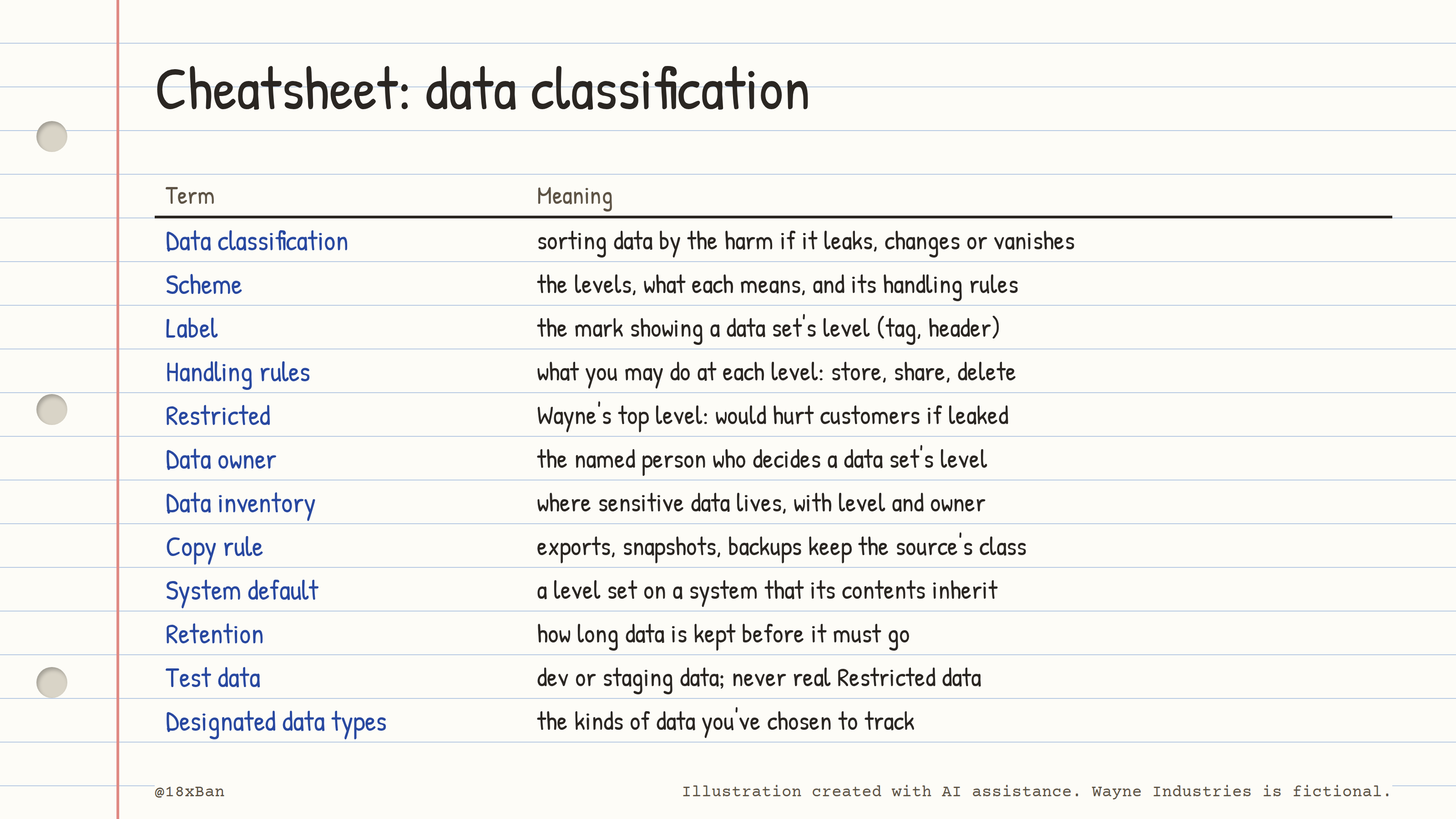
Data classification, on one page.
The takeaway
A classification scheme is only as good as the rule attached to each label. Label systems, not files, and make copies inherit their source's level. Read column names, not rows, when you go looking. Delete what you don't need, on purpose and on the record.
⚠️ This content is for educational purposes only. Wayne Industries is a fictional company. Nothing here is legal, audit, or compliance advice, validate against your own auditor and jurisdiction.